How business owners opt in to Bellis texts
Bellis texts a business owner only after the owner opts in, in Bellis’s Business Setup:
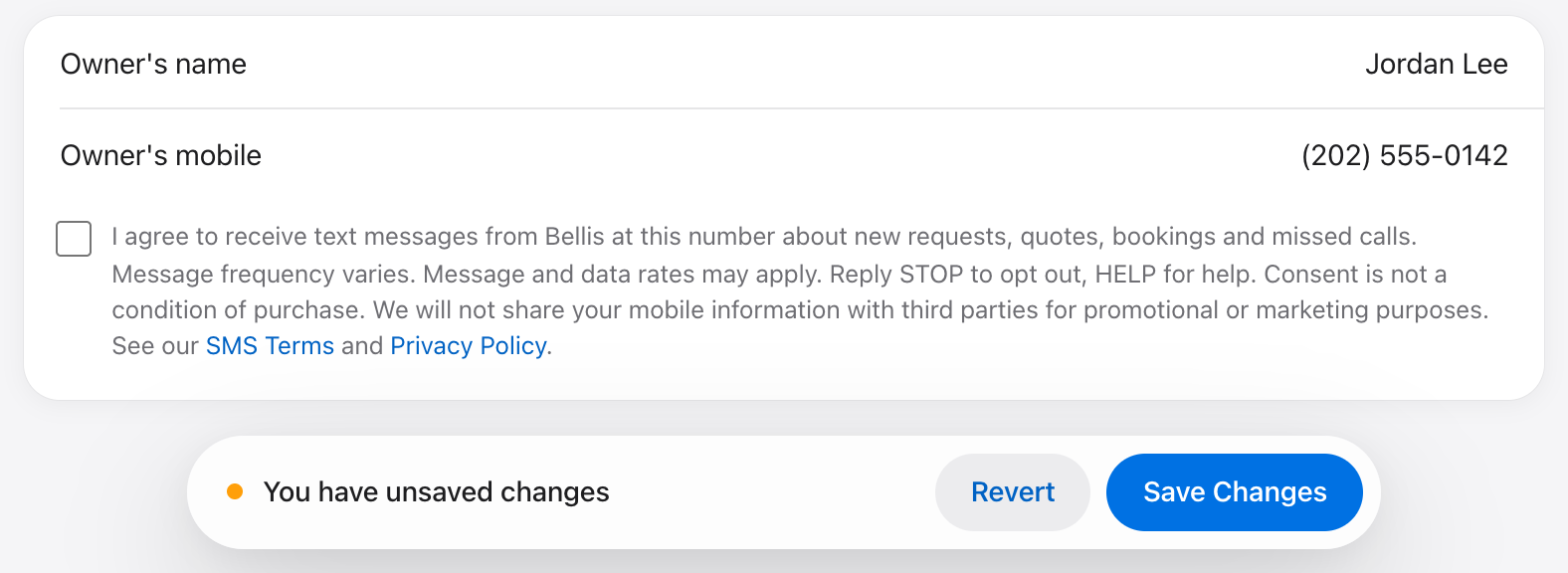
- The owner enters their mobile number in the “Owner’s mobile” field.
- The owner checks the SMS consent box under it. The box is unchecked until the owner checks it, and it reads:
I agree to receive text messages from Bellis at this number about new requests, quotes, bookings and missed calls. Message frequency varies. Message and data rates may apply. Reply STOP to opt out, HELP for help. Consent is not a condition of purchase. We will not share your mobile information with third parties for promotional or marketing purposes. See our SMS Terms and Privacy Policy.
- The owner clicks Save Changes. Bellis records the number and the time of consent, and sends one confirmation:
Bellis: Thanks for subscribing to business alerts about new requests, quotes, bookings and missed calls! Msg frequency varies. Msg & data rates may apply. Consent is not a condition of purchase. Reply HELP for help. Reply STOP to opt out.
Changing or ending consent
- A new mobile number has to be opted in again: changing the number unchecks the box.
- Unchecking the box, or replying STOP to any text, stops the texts. Replying START or checking the box again signs the owner up again.
- Reply HELP, or email internal@hologrow.ai, for help.
Consent is optional and is not a condition of using Bellis: everything Bellis texts about is also shown in the owner’s console. See the SMS Terms and Privacy Policy.